
Take Profit Trader lets you request a payout from the first day of a PRO account, provided you have earned enough to clear its buffer. There is no funded consistency percentage or minimum number of profitable days before that request. The harder part is keeping the account alive while building the buffer: the Test uses end-of-day drawdown, but PRO follows your highest intraday equity, including an open trade's unrealized profit.
That change is why I am more comfortable recommending TPT to experienced traders than to someone buying their first funded account. Daily withdrawals are useful once you can manage PRO's trailing limit. They offer little help if the account fails before you become eligible. My Chinese TakeProfitTrader guide includes the original walkthrough and recommendation; this review explains the purchase decision in English.
What you buy, and when trading becomes live
TPT is a futures funding program. You purchase a monthly Trading Test, meet its profit target and rules, then move to PRO. Both the Test and PRO use simulated execution. Eligible PRO profits can be paid in real money even though the trading account itself is simulated.
PRO+ is a later, invitation-based live-market stage. Orders then go to the exchange through Tradovate, profit share rises to 90%, and drawdown returns to an end-of-day model. Passing the Test does not immediately give you a live brokerage account. TPT's advertised account size is also not money you can withdraw or lose; the smaller drawdown allowance determines how much room you have.
| Condition | Test | PRO | Standard PRO+ |
|---|---|---|---|
| Execution | Simulated | Simulated | Live market |
| Drawdown | EOD trailing | Intraday trailing, or TDD | EOD trailing |
| Profit share | No payouts | 80% | 90% |
| Payout buffer | Not applicable | Required | None |
| Consistency | Best net day below 50% of total net profit | No percentage test | No percentage test |
| Activity requirement | New Tests: at least three traded days to pass | Round trip on at least one day per calendar week | Round trip on at least one day per calendar week |
PRO+ Development is a separate live configuration with smaller limits and a soft daily loss limit. The standard PRO+ column does not describe Development's risk allowance.
Test prices, limits and the HDP offer
Use HDP for 40% off the first month and renewals on the same active Test, with the US$130 PRO activation fee waived. Multiple purchases qualify. Tests bought with credits are excluded. Eligible active Tests bought at 50% off keep their original benefits.
| Size | Monthly fee | Profit target | EOD drawdown | Mini / micro limit |
|---|---|---|---|---|
| $25K | $150 | $1,500 | $1,500 | 3 / 30 |
| $50K | $170 | $3,000 | $2,000 | 6 / 60 |
| $75K | $245 | $4,500 | $2,500 | 9 / 90 |
| $100K | $330 | $6,000 | $3,000 | 12 / 120 |
| $150K | $360 | $9,000 | $4,500 | 15 / 150 |
The $50K Test's $170 base price becomes $102 at 40% off. A second billed month adds another $102 on the same active Test, before any optional reset. Buying a larger nominal account increases the target as well as the loss allowance. Compare the drawdown you need for your normal position size in the futures PropFirm selector, rather than selecting the largest label.
Renewal follows the original monthly calendar date. A failed Test keeps renewing until canceled; paying for a reset does not move its billing date. Passing stops the Test subscription. PRO has no recurring monthly subscription, but a paid PRO reset is a different expense. The subscription policy is worth reading if a renewal is close.
Passing the Test and the strict 50% boundary
For a new Test, you need the profit target, at least three trading days and a best net day below 50% of total net profit. Earlier five-day Tests retain their original minimum when reset. Each qualifying traded day needs a trade. A day that is too large does not automatically fail the Test, but it can keep you from passing until total profit grows.
On a $50K Test, a best day of $1,500 against exactly $3,000 total profit is 50%, so it does not meet the strict below-50% rule. Total net profit must exceed $3,000 while the best day stays at $1,500, and all other passing conditions still apply. The denominator is actual total net profit, not permanently the original target.
Commission reduces net results. Test and PRO charge $4.50 per mini round trip or $1.50 per micro round trip. PRO+ uses its broker's separate commission schedule. An example that ignores these charges can appear to qualify a few dollars earlier than your account actually does.
Use the TPT Test consistency calculator to check the original target, the strict below-50% boundary and the three-day or five-day requirement for your Test. It also shows how a losing day or a new highest day changes the calculation.
Completing the PRO contract and POA
After approval, open the PRO section of your dashboard and choose Go to PRO. If your Test purchase qualifies for waived activation, choose Your credits when selecting the payment method. You still need to complete activation yourself. TPT issues activation credits for Friday passes on the next business day, Monday, rather than over the weekend.
Complete the PRO trader contract and the Power of Attorney (POA) if you have not already signed them. The NinjaTrader branding on the POA is expected: NinjaTrader owns Tradovate. TPT requires the document to open PRO even if you use another trading platform. A later move to PRO+ remains a separate review.
| Field or document | What to enter |
|---|---|
| Name / Full Name | Your full legal name, matching your identity document and TPT registration. If split into fields, Given / First Name is your given name and Family / Last Name is your surname. |
| Address | Your actual current residential address, including any apartment or floor and the postal code. Keep it consistent with your supporting document. |
| Email / Phone | Your registered TPT email and your own phone number with its correct country code. For a Taiwan mobile number, +886 replaces the initial 0; follow separate country-code fields if provided. |
| Identification | A valid personal document of a type accepted by the upload field. For a passport, keep the full identity page and its details legible. |
| Proof of address | Prepare a bank statement or utility bill from the last 90 days showing your own name and residence, then check the form's accepted document types and date requirements. If household bills are in someone else's name, request a statement in your own name from your bank. |
| Social Security Number / SSN | The signed agreement shown here requires an SSN only from US citizens and residents. If neither applies to you, this field is not applicable. |
| Signature / Date | Read the document, then complete your own signature and date using its signing tool. Check required fields and attachments before submitting. |


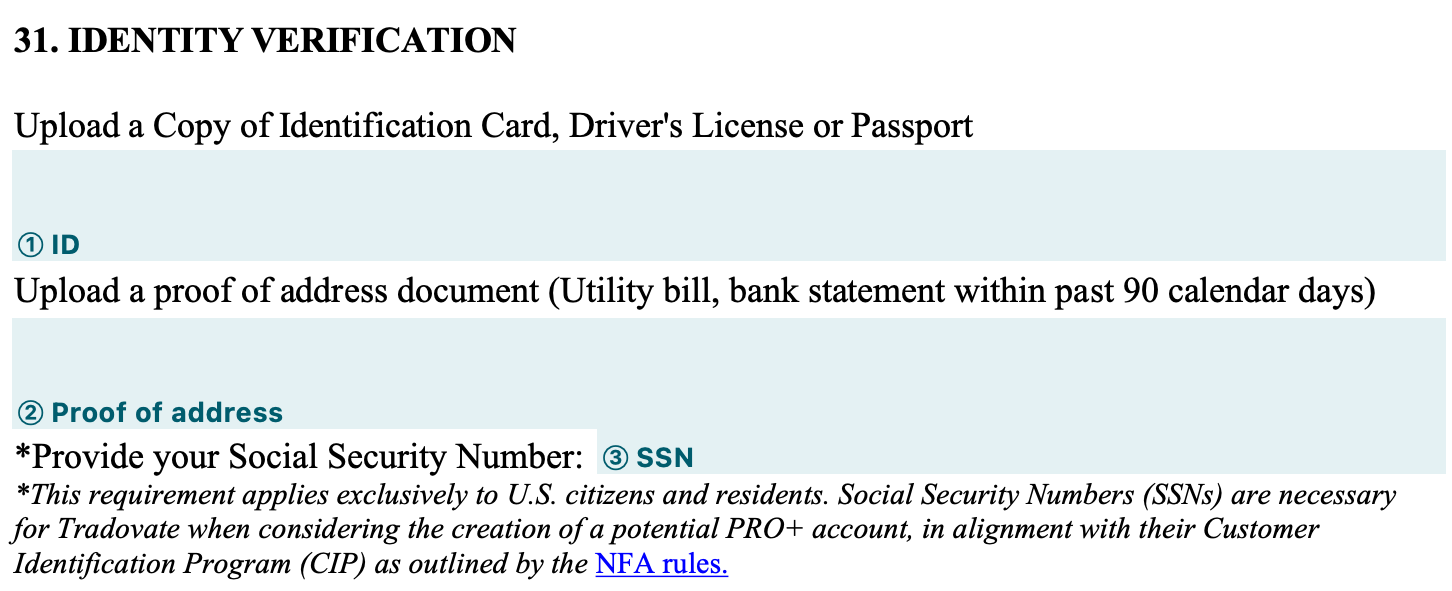
The proof-of-address upload and the POA authorization are separate documents. For preparation, use the TPT KYC guide and its document-checklist link.
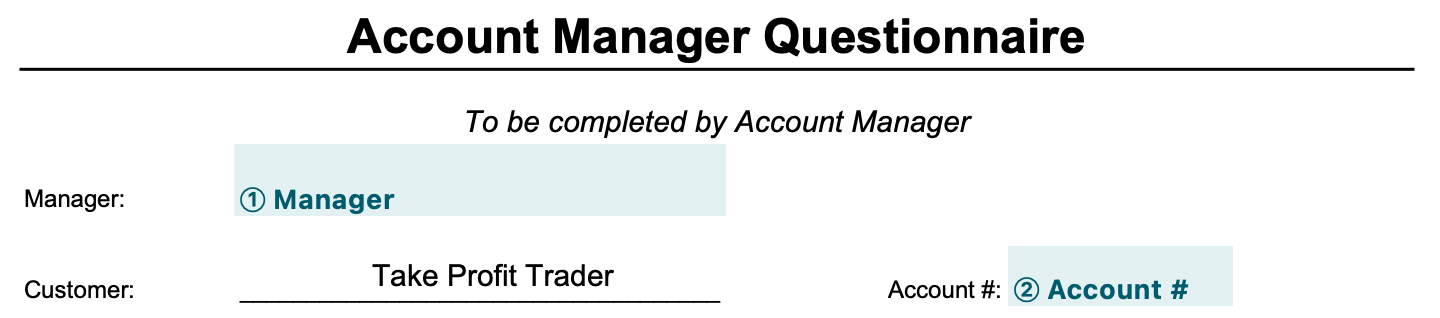
In the Account Manager Questionnaire, Manager means you and Customer means Take Profit Trader. Enter your legal English name as Manager. Check any Customer and Account # fields already completed by TPT; ask TPT for the correct details if a required field is empty. Answer the questionnaire for your own circumstances:
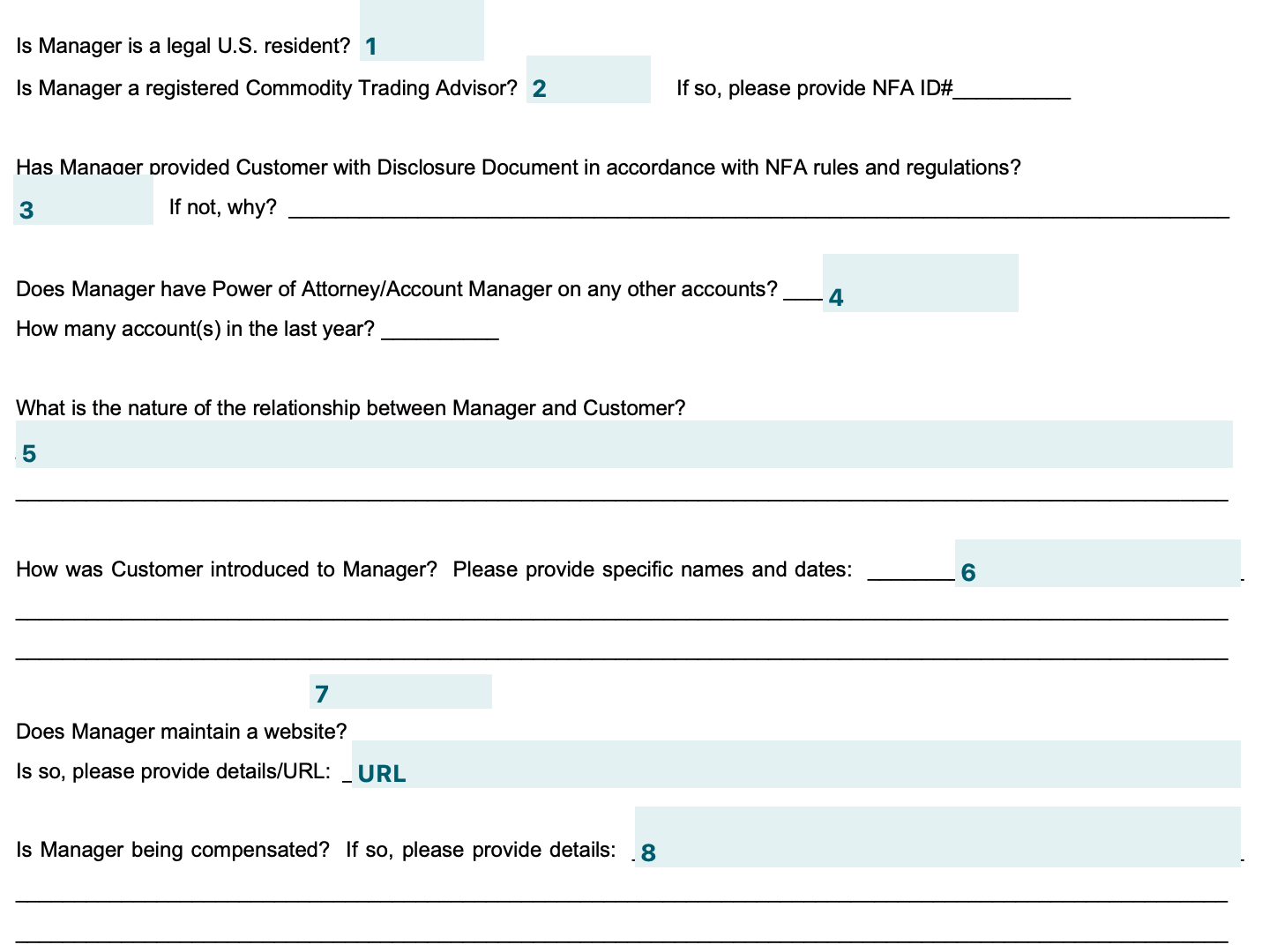
| Question | What it asks |
|---|---|
| Legal US resident | Enter No if you are not a legal US resident. |
| Registered Commodity Trading Advisor / NFA ID | Enter No and leave NFA ID blank if you are not a registered Commodity Trading Advisor. If registered, enter Yes and your NFA ID. |
| Disclosure Document | Enter Yes if you provided the required NFA disclosure document to TPT; otherwise enter No. The “If not, why?” field asks for the reason. Have TPT confirm the explanation applicable to your arrangement. |
| POA / Account Manager on other accounts | Enter No if you do not act as an authorized manager on other accounts. Otherwise enter Yes and the number of accounts for the past year. |
| Relationship / how introduced | For the business relationship, enter Business. For how you were introduced, use Through the Take Profit Trader website if you registered through its website, or give the referring person and date if introduced personally. |
| Website | If you have no website, enter No and put N/A in the URL field. If you operate one, enter Yes and its URL. |
| Compensation | Enter Yes if the management arrangement includes compensation and describe the agreed profit share or fees; enter No if it does not. Check any prefilled answer against the agreement. |
Read the authorization, sign it yourself and save the completed documents. If the process still shows an unsigned document, check both the contract and POA. Once activation is confirmed, open the PRO tab in the Control Center. The platform credentials and licence key carry over from Test; select the new PRO account inside the platform.
To check the live threshold on a Rithmic account, open RTrader Pro → Trader Dashboard → Auto Liquidate Threshold Value. This is the minimum balance your account must stay above. In Tradovate, add Drawdow Auto Liq Level and Dist Drawdown to the Accounts widget to see the threshold and remaining room.
Why a flat day can leave less room in PRO
EOD drawdown moves after a new highest end-of-day balance. PRO's TDD can move while a position is still open. Both floors stop trailing once they reach the account's starting balance, and neither floor moves back down after a losing trade.
Consider a hypothetical fresh $50K account with $2,000 drawdown. Equity starts at $50,000, rises to $51,000 during a trade, then returns to $50,000 at the close. With no higher previous closing balance, the Test's floor remains $48,000. In PRO, that same open profit moves the floor to $49,000. You finish flat but have only $1,000 left above it. Fees and slippage are omitted from this illustration.
Same equity path · different remaining room
Test: $2,000 room
No higher closing balance.
PRO: $1,000 room
The unrealized high moved TDD.
This is why simply repeating your Test position size can feel different in PRO. The trade can give back open profit without creating a realized loss, yet reduce the room available for the next trade. Smaller positions reduce how quickly those swings use up the allowance. Use the position-size and drawdown calculators against the remaining room, not the $50,000 nominal balance.
EOD does not mean losses are checked only at the closing bell. Touching the active minimum balance, including with an open loss, can fail the Test during the day. Its advantage is how the floor updates, not permission to trade below it.
TPT buffer and withdrawal amounts
Use the TPT payout rules and Wallet guide for step-by-step requests, gross-to-net examples and the exact $250 fee boundary.
A PRO buffer equals the account's drawdown amount. Profit above the balance shown below is eligible at the 80% split, subject to the account's other rules. The buffer amount is the profit you keep in PRO; the threshold is your starting balance plus that amount.
| Account size | Buffer amount | Balance before a surplus is available |
|---|---|---|
| $25K | $1,500 | $26,500 |
| $50K | $2,000 | $52,000 |
| $75K | $2,500 | $77,500 |
| $100K | $3,000 | $103,000 |
| $150K | $4,500 | $154,500 |
A hypothetical $50K PRO balance of $53,000 leaves $1,000 above the buffer. Requesting that $1,000 puts $800 into your Wallet after TPT's share. The trading balance then returns to $52,000. Reaching $52,000 exactly leaves no surplus for a regular above-buffer withdrawal.
Wallet withdrawals are a separate fee calculation. A request over $250 has no TPT withdrawal fee. A request of $250 or less costs $50. For example, a PRO balance of $52,300 leaves $300 above the buffer. Its 80% share is $240 in the Wallet; withdrawing $240 then costs $50, leaving $190 before any provider fee. The $50 is not deducted from the gross $300 before the profit split.
Closing a PRO account is different from making a regular withdrawal while keeping it active. The current PRO payout policy allows 50% of the buffer only after the account is closed. Decide that separately from the amount above the buffer. A closed account cannot be treated as an ongoing daily payout account.
From PRO to Wallet, then to your payment method
In the Control Center, select the PRO account and choose Withdraw. Close positions and working orders before confirming. Enter the amount and check The amount you get, which reflects the profit split, then choose Confirm & Withdraw. A successful transfer puts funds in the TPT Wallet; it does not mean your bank has received them. Rithmic and canceled-account requests can show an in-progress review instead.
Open Wallet under your user icon, enter the amount and choose Withdraw. After approval, go to Withdrawal requests and select Proceed. The first request includes the applicable tax form. Complete that step, then proceed with the offered payment method. The Wallet instructions separate US-bank Plaid payments from the Wise or PayPal flow for traders without a US bank account.
International payouts also include Routable, which sends funds to a local bank account. Choose the option available in your TPT dashboard and use your own recipient details. Wise and PayPal remain listed alternatives; the receiving method has its own fees and delivery time.
Wallet approval can take up to 12 business hours. Payment delivery has its own timing: a US bank transfer can take one or two business days in some cases, while Wise and PayPal requests have their own processing stage. Daily request eligibility is useful, but it does not promise a bank deposit within the same calendar day. The Control Center balance also updates on a schedule rather than tick by tick.
- PRO balance$53,000 → $52,000
Request the $1,000 above the buffer.
- TPT Wallet$800
Your 80% share enters the Wallet.
- Wallet withdrawal$800 requested
Above $250, so TPT's Wallet fee is $0.
- Payment methodBank · Routable · Wise · PayPal
Follow the payment option offered for your bank status. Provider fees and delivery time are separate.
Completing the tax form for your first Wallet withdrawal
Open Wallet → Withdrawal requests. Find your request marked In progress and click Proceed. Review the name and address on your TPT profile before opening the ComplyExchange tax interview. TPT uses your profile details to generate the applicable form.
An individual in Taiwan who is neither a U.S. citizen nor a U.S. tax resident can use the following guide when the interview presents Form W-8BEN.
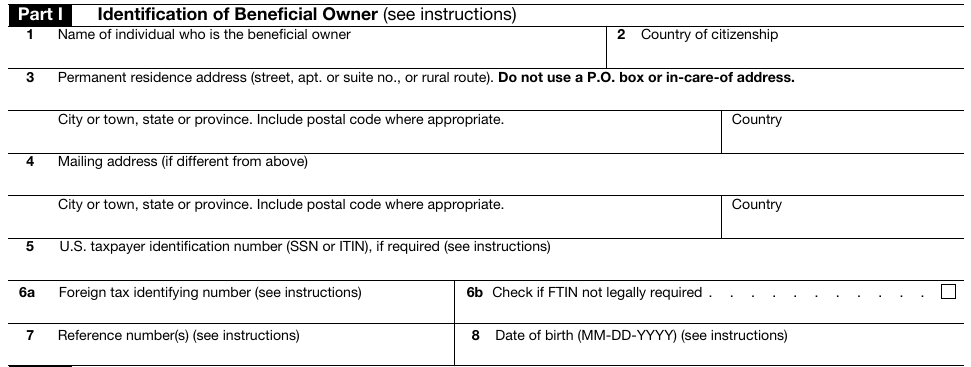
- Name and country of citizenship: Enter your full legal name and citizenship. Check the spelling against your passport.
- Permanent residence address: Enter your residential address in your country of tax residence, including city, postal code and country. Add a mailing address if it differs.
- Tax identification numbers: The U.S. taxpayer identification number field is for a U.S.-issued SSN or ITIN. The foreign tax identifying number is issued by your jurisdiction of tax residence. Complete the applicable field in the interview.
- Date of birth: The printed form uses MM-DD-YYYY. March 12, 1990 is 03-12-1990.
Claim treaty benefits only if you qualify and can identify the applicable provision. Read the certification and sign with your legal name once you can certify that the statements are correct.
Back in TPT, Pending means the form is under review. For Failed, check the rejection notice. Once it reads Approved, click Proceed again on the same withdrawal to enter your payment details. Find the signed copy in Documents. TPT’s tax form guide · IRS instructions for Form W-8BEN.
TradingView, weekly activity and trading restrictions
Choose the CQG/Tradovate connection if you want to trade through TradingView. Follow the TPT TradingView connection guide for activation, Demo login and account checks. For issued Rithmic credentials, the TPT Rithmic activation and connection guide covers the separate setup. Finish the connection setup and select the simulation environment for Test and PRO; those stages do not become live just because the trading platform can also handle live accounts. The trading tools directory covers the surrounding software choices.
TPT permits the TradingView Basic plan, but that does not make every charting feature or data upgrade free. Check your platform subscription and connected exchange data separately. Other paid platforms may need their own license. Test and PRO trading commissions also remain separate from a charting subscription.
PRO and PRO+ require a round trip on at least one day per calendar week, Sunday through Friday. This is an activity rule even though there are no minimum profitable days before an eligible payout. The general session runs from 6 p.m. to 5 p.m. New York time, with automatic position closure at 4:55 p.m. Earlier product or holiday cutoffs still apply.
PRO+ earnings-day trading hours:On designated major earnings dates, PRO+ live accounts close early at 4:01 p.m. ET and resume at 6 p.m. ET in the following trading session. Test and PRO accounts are unaffected and retain their usual 4:55 p.m. ET close. The announced ET dates are October 20, 21, 28, 29 and November 2, 17, 2026; dates may change with advance notice to active PRO+ traders.
For PRO and PRO+, be flat with no working orders one minute before, during and one minute after prohibited events such as the FOMC statement, NFP and CPI. Check TPT's trader calendar for the relevant event and product. FED speakers and FOMC minutes are not the same event as the prohibited FOMC statement. Test has no news restriction.
For approved tools and per-account quantity checks, use the TPT copy trading guide and follower worksheet.
Manual trading is required; automated trading bots are prohibited. Opposite positions across your Test, PRO and PRO+ accounts, including closely related contracts, can violate the counter-position rule. A copier does not excuse an execution mismatch. If TPT flags one, use the detailed counter-position report to check its timestamps, instruments, order actions and overlapping exposure before contacting support.
PRO+ invitation and Development accounts
PRO+ promotion follows a review of trading consistency, risk management, execution and discipline. A particular profit figure does not automatically qualify you. At transition, $5,000 of PRO profit is frozen while PRO+ is active; profit above that amount can be withdrawn under the PRO split. The live account starts at $0 with the original size's drawdown allowance. A $50K route therefore starts with a floor at −$2,000, which trails after profitable closes until it reaches $0.
Standard PRO+ has no payout buffer and pays a 90% share. Leaving profit in the live account creates room above its floor; withdrawing profit removes some of that room. If the live account ends negative, that loss is deducted from the frozen PRO profit. The remaining frozen amount follows the applicable PRO profit-share terms. Review the transition agreement before treating the frozen $5,000 as available spending money.
PRO+ Development is still live trading. On its $50K configuration, the limit is two minis or twenty micros, with a $1,000 soft daily loss limit and $1,250 EOD drawdown. The soft limit pauses trading rather than immediately failing the account, but the overall drawdown remains a hard limit. Placement and a return to standard PRO+ depend on risk review, not an automatic profit target.
Development also has a specific rolling-30-day live-capital rule. Net losses of TPT's capital reaching $10,000 trigger a 30-day pause on new purchases and resets. Giving back profit you had built is not itself a loss of TPT's starting capital, and TPT's 10% share of live payouts offsets the total. Existing active accounts can continue trading and the Wallet remains withdrawable. Reopening purchases requires risk review. This policy is specific to Development, not a new $10,000 allowance for ordinary PRO accounts.
Use the TPT commission rates and transaction-cost calculator to compare standard and micro contract fees, partial exits and gross versus net trading results. PRO+ needs its assigned broker rate.
Costs and risks that remain after passing
Optional Test resets cost $79, $99, $139, $169 or $199 across the five sizes. PRO allows up to three paid resets, at $449, $649, $799, $999 or $1,499. That difference can outweigh a discounted Test fee. The TPT reset and restart comparison separates the available routes and lets you compare your quoted costs. Fully closing the PRO subscription removes the reset route, so compare the charge with a new Test before selecting either option.
You can trade up to five active funded accounts combined across PRO and PRO+, alongside unlimited Tests. Up to ten passed Tests can be activated within thirty calendar days. Several accounts multiply fees and execution responsibilities as well as potential payouts; they do not combine their individual drawdown allowances into one.
Public reviews include reports of fast payments and helpful support, alongside complaints about account restrictions, counter-position decisions and platform behavior. These are individual reports, not a guarantee of what will happen to another account. Keep the agreement, order records and payout status needed to resolve your own issue. KYC approval and the current restricted-country list and travel rules matter before purchase and when traveling, including where account access and market data originate.
For phone-code selection, identity status messages and support routes, use the Take Profit Trader KYC guide.
My preference for a new trader remains an EOD funded route rather than starting with PRO's TDD. TPT becomes more attractive when you already trade small enough to manage that moving floor and can build the buffer without forcing a large winning day. At that point, daily requests without a funded consistency percentage are a practical benefit.
Take Profit Trader with HDP
The early Black Friday purchase window ended November 12 at 04:59 UTC. Tests purchased with credits were excluded.
HDPAffiliate disclosure: a qualifying purchase through this link or code may earn a commission without adding to your price.
Take Profit Trader FAQ
Does passing the Test give me a live account?
It leads to simulated PRO. Live-market trading begins with an invited PRO+ upgrade and its onboarding requirements.
Can I pass in three trading days?
Three is the minimum. You still need the target, a best net day below 50% of total net profit and compliance with the other Test rules.
Does a 50% best day fail my Test?
It prevents passing at that point. Increase total net profit while keeping the largest day's share below 50%, with the account otherwise within its rules.
Can I withdraw at exactly $52,000 on a $50K PRO account?
That is the buffer threshold. There is no surplus above it for a regular withdrawal; the separate closed-account buffer policy is different.
Is a $250 Wallet withdrawal free?
No. TPT charges $50 at $250 or less. The request must exceed $250 to avoid that TPT fee; payment-provider charges can still apply.
Does a failed Test stop billing?
No. Cancel the subscription to stop renewal. A reset is a separate paid action and does not change the original renewal date.
Does the Test fee continue after passing?
Passing stops the Test subscription. PRO has no recurring monthly subscription; optional resets and any costs outside the offer are separate.
Can I use HDP with promotional activation benefits?
HDP takes 40% off the initial Test fee and renewals. PRO activation is waived on the qualifying account.
Is all news trading prohibited?
The Test has no news restriction. PRO and PRO+ use a prohibited-event calendar and require flat positions with no orders around those events. Check the actual event rather than treating every announcement as identical.
Can a Rithmic login connect my TPT account to TradingView?
TradingView uses the CQG/Tradovate route. Choose that connection and complete its platform setup.
Does PRO+ remove all risk limits?
No. Standard PRO+ still has EOD drawdown and trading restrictions. Development has additional tighter sizing and a soft daily loss limit.
Can I have five PRO and five PRO+ accounts?
The limit is five active funded accounts combined, not five of each. Test accounts are separate from that active-funded limit.