
Take Profit Trader requires new users to complete KYC before buying their first Test. If you are stuck, check which screen you are on: email confirmation, identity verification and trading account activation each need a different next step.
This guide covers identity checks and the messages that appear along the way. For Test fees, drawdown and payout conditions, use the Take Profit Trader review.
For document preparation across programs and payment services, see the prop firm KYC document and address checklist.
Start KYC from your TPT dashboard
Confirm your registration email, log in at Take Profit Trader, then choose VERIFY MY IDENTITY in the dashboard prompt. Follow the identity form's document and capture instructions for your country.
On a phone, swipe sideways across the dark screenshots to read them at their original size.
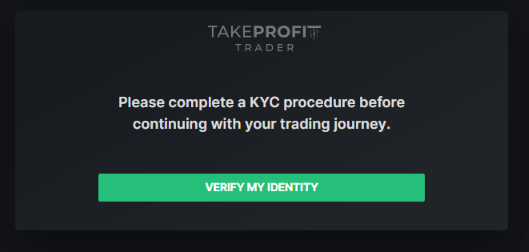
If you cannot get as far as the dashboard, check the confirmation message in Spam, Junk and Promotions. The login page has a Resend link for the verification email. A password reset changes the password; email confirmation still needs its own link.
The registration instructions put KYC before the first Test purchase. Once it is approved, continue to account selection.
Which country code should your phone number use?
Select your actual country of residence in the residence field. At the phone step, choose the dialing code of the country where your phone number is registered. These two selections can differ.
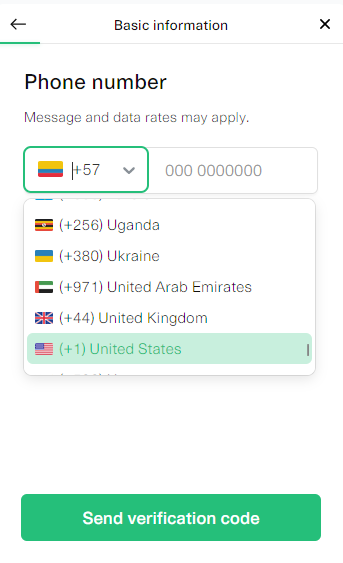
Enter your number, choose Send verification code, then confirm the code to continue to the address step. Use the code for your own number; the selected code in the picture is only an example.
A dialing-code menu is not a list of eligible trading locations. Check the separate TPT country and travel restrictions for that decision. TPT explains the different-country phone procedure in its phone verification guide.
Manual review, failed verification and Try again
An approved identity check produces a confirmation email. Some checks go to an administrator instead. TPT describes a 24/5 review team, but a manual-review message does not give your case a fixed completion deadline.
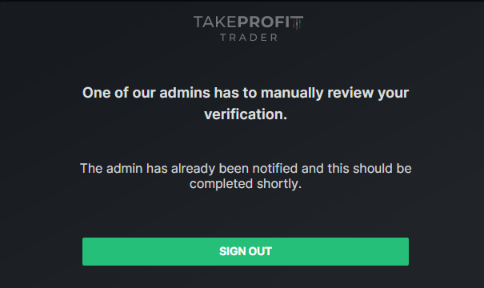
A failed attempt also goes through manual review, with next steps sent by email. After review, an application can be approved, require resubmission, or be rejected with a reason. If the screen offers TRY AGAIN, use it to resubmit the requested information.
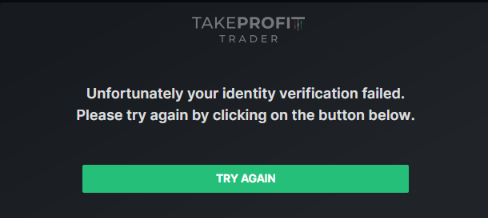
If the error tells you to contact support, open Live Chat on the official homepage. Support can pass the case to an administrator. These outcomes are explained in the KYC procedure.
Which verification is pending?
Read the heading around the status before choosing a fix. A dashboard can show a pending trading account after identity verification is already finished.
| Where you see it | What is waiting | Your next step |
|---|---|---|
| Email confirmation | Registration email verification | Open the email link; use Resend if needed. |
| Identity verification / admin review | Personal KYC review | Wait for the email result or follow the displayed support instruction. |
| Purchased Test / trading account Pending | Trading account or data-feed activation | Check the CQG or Rithmic setup for that account. |
| Company verification In progress | Company information review | Check KYB status in the company verification flow. |
| Authenticator or recovery-code screen | Login security check | Use your MFA method or the offered recovery route. |
For a first CQG account, the account holder completes the market-data agreements, then activation is generally processed in 10–15 minutes. Rithmic activation waits for confirmation that the trading account has been created. A weekend Test can remain pending until markets reopen on Sunday at 5 p.m. Central US time.
Use the TPT TradingView setup for the CQG route, or the TPT Rithmic setup for that connection. The official Pending guide covers activation delays. If the stated processing window has passed, ask support about the trading account status.
Company verification and MFA recovery
Company verification comes after personal KYC. TPT's KYB process supports US companies: choose As a company, enter the company information and select Verify company. To resume it later, open User Profile → Identity → Switch to Company. The company-review waiting period allows continued trading as an individual after personal verification.
MFA is a separate login-security feature. If you enabled it and lose your authenticator, choose Try Another Way to use a saved recovery code. If that route is unavailable, Lost Access to Your MFA leads to an identity check for restoring access. The MFA instructions explain the recovery choices.
Contacting TPT about verification
Open the chat button on the official TPT homepage. Describe the screen, exact error wording and whether the problem concerns email, personal identity, company verification or a purchased trading account. That gives support a specific issue to route.
The Live Chat hours page lists Sunday 4 p.m. to Friday 4:30 p.m. EST, with holiday changes, and provides an email contact outside those hours. Use that current contact page when live chat is closed.
Choosing a Test after KYC
Use HDP when checking the current eligible offer. Confirm the selected Test and recurring charge before purchasing.
HDPA qualifying purchase through this affiliate link or code may earn a commission without adding to your price.
Take Profit Trader KYC FAQ
Can I buy my first Test before KYC?
New-user registration places the identity check before the first Test purchase.
Does resetting my password verify my email?
Email confirmation needs the link in the verification message. Use the login page's Resend option if that message is missing.
Can my phone number be registered in another country?
TPT documents that option. Keep your actual residence selected and set the phone field's dialing code to the number's country.
Does a phone country code prove I am eligible?
Eligibility is a separate check. Follow the country-restriction policy rather than treating the phone dropdown as approval.
Does manual review mean I was rejected?
It means an administrator must review the check. The result arrives by email.
Can verification finish in a few minutes?
Some successful checks do. A case that needs review can take longer; follow its status and email instructions.
Which identity document should I upload?
Choose a document offered in your current identity form and follow its capture instructions. The form determines the available options.
Is Pending after purchasing a Test another KYC failure?
Check whether Pending belongs to the trading account. CQG agreements or Rithmic account creation can still be waiting after personal identity approval.
Can a weekend purchase remain pending?
The trading-account guide says a weekend Test remains pending until the futures market reopens.
Does company verification replace personal KYC?
Personal KYC comes first. The separate company flow verifies US company information.
Why am I asked for identity verification during MFA recovery?
The Lost Access to Your MFA option uses an identity check to restore access when the available MFA recovery methods cannot be used.
Who handles a KYC error that asks me to contact support?
Start with TPT's official Live Chat. The support team can refer the verification issue to an administrator.
Last updated: October 19, 2026.